
Xtreme HD FAQ
Common issues for Xtreme HD IPTV users, such as setup, login, buffering, device compatibility, and general troubleshooting, can be resolved with this Xtreme HD FAQ. If you are having Xtreme HD problems, this guide offers reasons and quick solutions.
- Home
- Pricing Plan


Our Introduction
How do I fix Xtreme HD not working?
Xtreme HD IPTV can be temporarily down, or you can be having issues with your login or device.
Here are some solutions to try:
- Make sure your device is connected to the internet
- Fully close and relaunch the IPTV app
- Re-enter login credentials
- Clear the app cache
- Reinstall the IPTV player
Many IPTV issues can be resolved with a restart or by relogging.
Pricing Plan
What is Xtreme HD IPTV?
Xtreme HD IPTV is an internet based, cable and satellite free solution for streaming live TV, movies, and entertainment. Xtreme HD IPTV works with IPTV players and has compatibility with many devices, such as Firestick, Android TV, Smart TVs, iPhones, and PCs.
24 Hours Trial
- High-Quality Digital Streaming Service
- Multi-Device Compatibility
- Smart TV, Android, iOS & Web Support
- User-Friendly Interface
- Premium Entertainment Platform
Test the service with a quick and smooth streaming experience before choosing a full plan.
One Month
- Electronic Program Guide (EPG) Support
- Catch-Up & Replay Features
- Secure & Stable Streaming Technology
- Anti-Buffer Optimization
Enjoy reliable entertainment and flexible access with a full month streaming package.
3 Months
- Flexible Viewing Experience
- Cloud-Based Streaming Access
- HD, Full HD & 4K Support
- Global Server Connectivity
- Smooth Streaming Experience
Get extended viewing time with a stable and cost-effective streaming experience.
1 Year
- Easy Installation & Setup
- Continuous Platform Improvements
- Instant Account Activation
- Worldwide Accessibility
- 24/7 Technical Assistance
Unlock long-term entertainment with premium performance and uninterrupted streaming access all year.
Type of films
Why is Xtreme HD buffering?
Xtreme HD IPTV buffering is typically a result of an internet or network issue.
- Some common issues can be:
- Slow internet
- Weak WiFi
- High server load
- Background apps that take up bandwidth
For streaming entertainment without buffering, a reliable connection of 20 Mbps is the minimum recommended. Using a wired (Ethernet) connection or ensuring a fast WiFi connection can help lessen the buffering.
Frequently Asked Questions About Xtreme HD IPTV
What is Xtreme HD IPTV, and how can I use it?
Xtreme HD IPTV allows you to watch your favorite television shows and movies on your computer or smart device through your choice of application using the internet. Xtreme HD IPTV also allows you to watch live television and sporting events without using a traditional cable service.
Unfortunately, there are a number of reasons why your Xtreme HD IPTV service could stop working, the most common reason being the internet service you are connected to is unstable. Other common reasons Xtreme HD IPTV service could stop working are an expired subscription or server maintenance. A common workaround that solves the problem is switching your IPTV app to another internet connection and logging in again.
What causes streaming lag or buffering on Xtreme HD?
Buffering happens when your internet speeds are inconsistent or if your server is busy. Buffered streaming can occur from WiFi interference, multiple devices connected to your WiFi, or even downloading files in the background.
How can I improve Xtreme HD streaming performance?
The most common way to improve performance is by using the internet that is faster and more consistent at 20 Mbps or more. Quitting unused applications, using a wired connection instead of WiFi, and using the best IPTV players available can improve performance the most.
Why can’t I log into Xtreme HD IPTV?
Not being able to log in is most often due to either entering your information incorrectly or the server information being outdated. Xtreme HD IPTV uses both Xtream Codes API and M3U links, and both require accurate information to access.
What devices work with Xtreme HD IPTV?
The service works with many devices including Firestick, Android TV boxes, Smart TVs, Android Phones, iOS, Windows and Mac computers. Other devices dedicated for streaming tend to be the most reliable.
How long does IPTV setup take?
The most common setup time is only a few minutes post installing the IPTV app. After you enter your subscription information, the channels and content will load on their own with no extra configuration required.
Why do some channels not load or show up?
Channels may show up missing for a number of reasons. Subscriptions may have expired, there may be a temporary issue with the server, or the playlist may be outdated. Most of the time, the issue can be resolved by refreshing the app, reloading the playlist, or restarting the device.
What is the best internet speed for IPTV without lags?
For smooth basic streaming, 10 Mbps may get the job done; however, HD streaming requires around 20–30 Mbps for optimal performance. For 4K streaming, the speed will have to be higher, but connection stability is more important than speed.
Xtream Codes vs M3U login?
The biggest difference between the two is that Xtream Codes requires a structured login using a server URL along with a username and password. This can make it easier for most. Access is similar for M3U links but does not require a login and is a direct link to the playlist.
Is accessing Xtreme HD IPTV on multiple devices possible?
This is all dependent on the subscription plan. Multi-device access may be limited to a single device connection, or it may be allowed depending on how many continuous streams are allowed by the provider.
Is it safe or legal to use Xtreme HD IPTV?
This depends on the regulations of the country the user is in, as well as how the content is licensed. Before using any streaming service, users should make sure they stay in the legal confines of their country.
IPTV problems like buffering, log-in issues, or channels not loading
IPTV problems like buffering, log-in issues, or channels not loading can be resolved by verifying the internet speed, checking log-in data, or restarting the app. An appropriately configured system makes uninterrupted streaming possible.
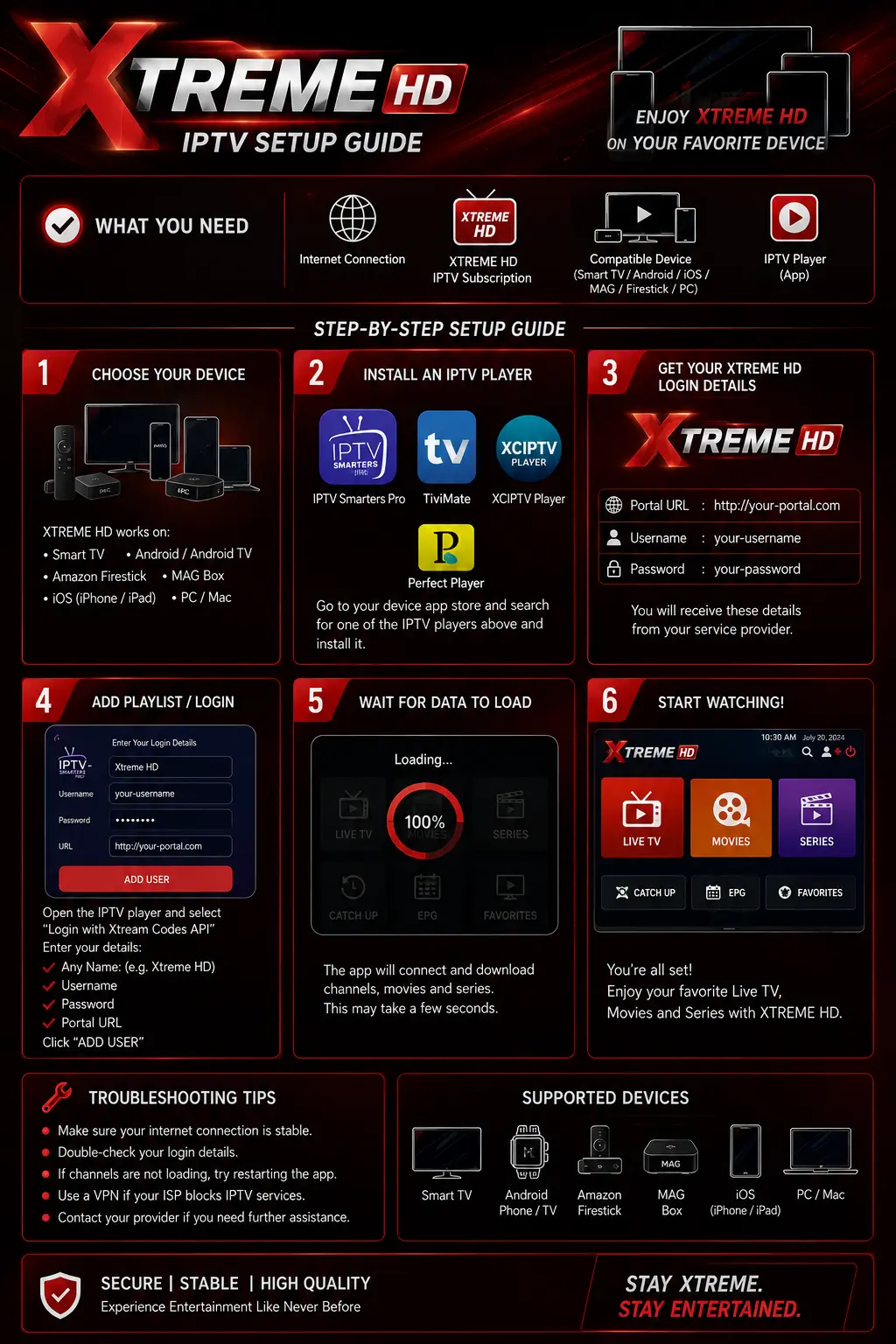
How do I fix Xtreme HD buffering issues?
To resolve Xtreme HD buffering, ensure you are using a high speed internet connection, restart your router, close any unnecessary running applications, and use a better IPTV player e.g. TiviMate, IPTV Smarters, etc. Finally, Establishing a wired Ethernet connection will definitely optimize the buffering situation. Beyond those users can expect good results regarding lag and buffering.
How do I solve Xtreme HD login issues?
If you are experiencing Xtreme HD login issues, please check to ensure that your username and password, as well as the server URL, are input correctly, as authentication errors are primarily due to incorrect credentials. If the information is correct and the login issue persists, force stop the app and try logging in again or uninstall and reinstall for better connection to the server. Xtream Codes API login issues are primarily due to the correction of login information or application updates.
Which devices support Xtreme HD IPTV?
Xtreme HD IPTV is compatible with devices such as Amazon Firestick, Fire TV, Android TV boxes, Smart TVs, Android Phones and Tablets, iPhones, iPads, Windows and Mac Computers. For better streaming, most people prefer using Firestick and Android TV Boxes.
How do I set up Xtreme HD IPTV?
Setting up Xtreme HD IPTV is very easy.
Download IPTV Smarters, an IPTV player, or compatible players, like TiviMate, and sign in using either the Xtream Codes API or M3U playlist methods. After entering your Xtreme HD IPTV subscription credentials, wait for the channels to populate. You are now ready to stream. It’s a simple process that typically takes around three to five minutes.
Xtreme HD uses Xtream Codes to verify your credentials. If your Xtreme HD channels don’t stream, it may be due to an invalid subscription, bad app cache data, or the Xtreme HD server being down. Try restarting the app, clearing the cache, checking your internet connection, and/or making sure your Xtream HD subscription is up and running. Any of these may fix the problem.
Xtreme HD IPTV recommends 10 Mbps for a speedy IPTV streaming experience with standard definition content. For HD, the recommendation is 20 to 30 Mbps. Plan on using 4K? 40 Mbps and a steady connection is what Xtreme HD recommends. However, they do say that steady connections are typically more important than the max download speeds.
Xtream Codes is a fast and popular way to sign into subscription-based IPTV apps for services like Xtreme HD. It’s only three pieces of information to sign in: a username, password, and server URL. With Xtream Codes, services and content like movies and TV shows are auto populated and ready to stream.
M3U Playlist Definition
Media players capable of importing IPTV channels utilize M3U playlists as direct links. There are similarities in content access for M3U playlists and Xtream Codes API, but many users opt for Xtream Codes as it simplifies the process of configuring the layout for channels and on-demand content.
Xtreme HD on Multiple Devices
Xtreme HD allows usage on multiple devices within the limits of your subscription. Some plans are limited to a single device for streaming, and other subscriptions include multiple connections for family. Check your subscription to see how many devices can use the service at the same time before streaming on multiple devices.
Phone
+923480398983
contact@xtremehd.com
Address
USA
UK Address
66 Broklyn Street USA
Our Testimonials
Is Xtreme HD IPTV legal?
The legality of IPTV services is dependent on the country you are in and the licensing of the content. Services need to be used in accordance with the law.
Xtreme HD has been a service I have found to be extremely helpful. I now have an understanding of safer and more reliable services that modern streaming has to offer.

Xtreme HD has provided streaming services and how to use them legally in a way that has greatly improved my understanding of the streaming services. It has simplified the understanding of safe streaming practices and the rules regarding copyright.
What I enjoy most is that this platform prioritizes awareness of legal streaming. They have chosen to sidestep gray area content, and instead used their resources to show how to be more compliant on the web.
This platform explains what to look for in licensed streaming services. It emphasizes safety, legality, and responsible use of digital media.